
Blog
Laser Cut Acrylic for Home & Business: DIY, Signs & LEDs

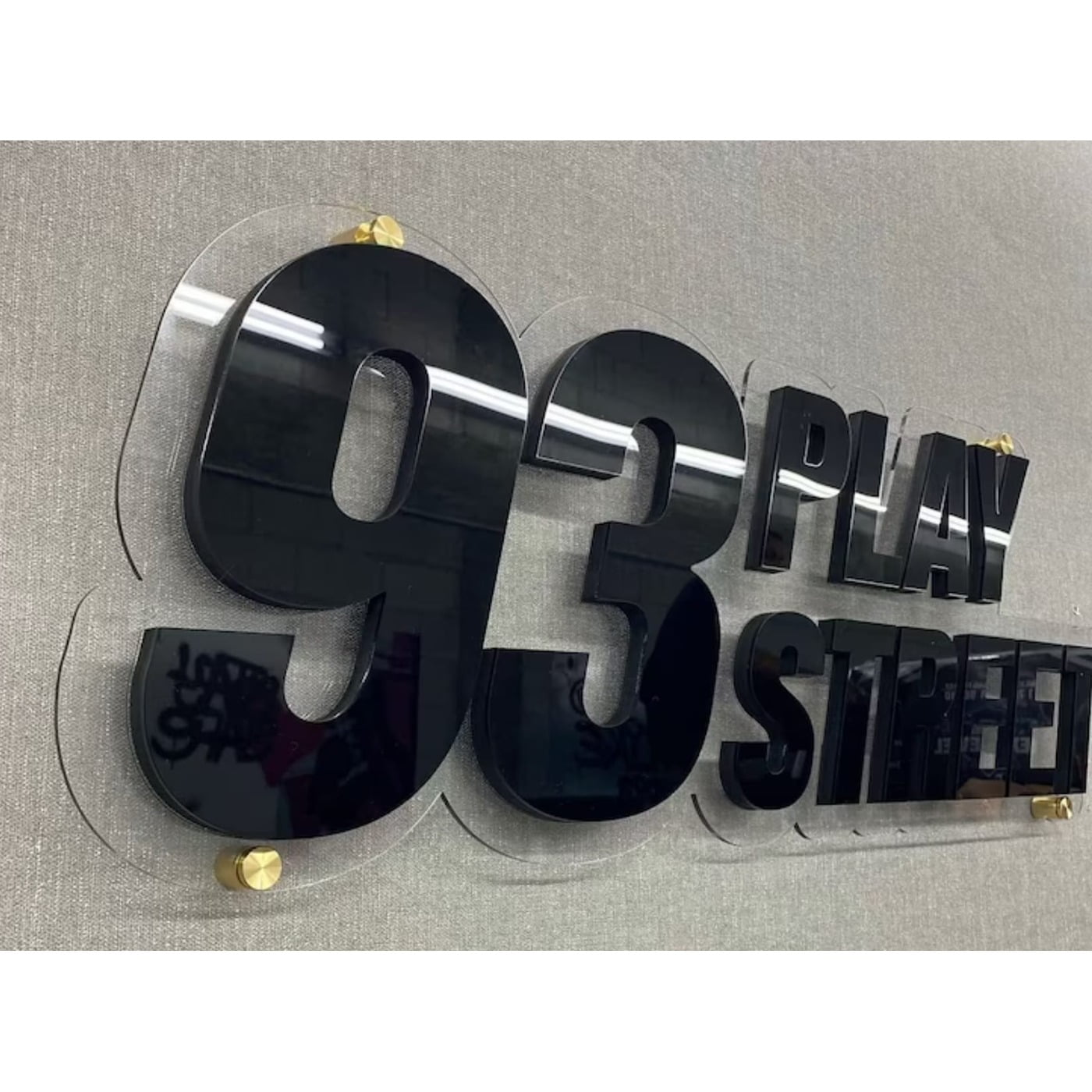
Laser Cut Acrylic: The Complete Guide to DIY Projects, Signs, Lighting & Commercial Use
We present a definitive, practical guide to laser cut acrylic, designed for makers, designers, small-business owners, and interior professionals. This resource covers diy laser cut acrylic home projects, acrylic lighting fixtures, led backlit acrylic signs, custom acrylic designs, machine selection in a laser cutting machine comparison, and step-by-step instructions from how to laser cut acrylic at home to laser engraving acrylic tips. We balance creative inspiration with technical clarity materials, safety, finishing, and cost-effective signage solutions so you can move from concept to finished piece with confidence. Expect real-world tips on how to bond acrylic sheets together, uv resistance of acrylic signs, acrylic vs glass, and eco-friendly signage materials.

1. What Is Laser Cut Acrylic?
Definition & overview. Laser cut acrylic refers to acrylic sheet materials precisely cut, engraved, or etched using a focused laser beam. Unlike mechanical saws or CNC routers, laser cutting vaporizes a tiny path of material to create crisp edges, fine detail, and complex shapes without mechanical stress. We often choose acrylic for its clarity, color range, and ease of finishing. The process supports custom acrylic designs, whether for acrylic lighting fixtures, led backlit acrylic signs, or acrylic wall art diy. In short, laser cutting turns flat sheets into precise components for signage, decor, jewelry, and functional parts.
Key characteristics. Acrylic is lightweight, weather-resistant when specified, and available in thicknesses from thin craft sheets to robust panels. The edges polish to a glass-like finish when cut cleanly. For signage and lighting, acrylic’s optical clarity is ideal light can be channeled and diffused for illuminated acrylic signs. From a maker’s perspective, laser cutting’s repeatability and precision make it perfect for templates, jigs, and product prototyping.
Analogy: Think of laser cutting as a sculptor’s scalpel subtle, precise, and able to release details that are impossible with chisels. For businesses and hobbyists alike, the technology scales from single laser cut acrylic gifts to production runs of branded acrylic signage for events.
2. Benefits & Versatility of Laser Cut Acrylic
Why choose acrylic? Acrylic offers many advantages: lightweight signage options, visual clarity, and an aesthetic appeal of acrylic signs that’s modern and polished. Acrylic’s adaptability enables custom acrylic designs from thin acrylic jewelry diy to large acrylic partitions for open spaces. The material can be backlit, layered, colored, and bonded cleanly to fabricate multi-dimensional pieces.
Versatility across applications. Acrylic’s strengths span interior décor (clear acrylic home accessories, wall art, furniture accents), commercial signage (durable signage materials, advantages of acrylic signage), and event design (wedding décor, personalized gifts). Its easy maintenance of acrylic signage makes it popular for long-term displays and retail fixtures.
Business and maker advantages. For small businesses, acrylic provides costeffective signage solutions and fast job turnaround quick turnaround for acrylic signs while maintaining a high-end look. Because acrylic is machinable and printable, it supports customization options for acrylic signs including logos, color-matched branding, and integrated lighting. Combined with laser tech, you get tightly controlled tolerances that are ideal for assembly and modular designs.
3. Acrylic Types & Best Materials for Laser Cutting
Common acrylic types. Cast acrylic (cell-cast) and extruded acrylic are the primary formats. High-quality acrylic vs low-cost options matters: cast acrylic generally cuts cleaner and polishes better; extruded acrylic is cheaper and more consistent in thickness but may produce more edge charring if laser settings aren’t tuned.
Colored vs clear acrylic. Clear acrylic vs colored acrylic: clear is best for optical clarity and lighting diffusion; colored or translucent sheets are great for brand palettes and decorative effects. Frosted or matte finishes offer soft diffusion for acrylic lighting fixtures and illuminated signs.
Thickness & texture options. Acrylic sheet thickness guide: pick thickness based on structural requirements 2–3 mm for lightweight signs and crafts, 6–10 mm for freestanding signage and decorative panels, and 12 mm+ for heavy-duty furniture elements. Texture options for acrylic sheets include matte, gloss, frosted, and patterned each changes light behavior and tactile feel.
Specialty materials. Consider UV-stabilized acrylic for outdoor use (uv protection in acrylic sheets, uv resistance of acrylic signs) and impact-modified grades for high-traffic areas. For extreme outdoor demands, evaluate acrylic vs polycarbonate for signage polycarbonate is more impact resistant but less optically clear and harder to laser cut.
4. How Laser Cutting Works: A Step-by-Step Overview
The process in plain steps. Laser cutting uses a focused light beam to heat, melt, and vaporize a narrow path through acrylic. Key components are the laser source (CO₂ or fiber), optics, motion system, and exhaust. For acrylic, a CO₂ laser is the standard because its wavelength couples well with thermoplastics.
Parameters to control. We set power, speed, frequency (pulse rate), and air assist to optimize cuts. Too much power or slow speed increases charring and melt; too little causes incomplete cuts. Understanding laser cutting precision is essential for clean edges and accurate joints especially when creating laser cut acrylic templates and interlocking parts.
Edge quality & finishing. Laser-cut edges typically have a slightly matte or polished look depending on settings; edge polishing is a common post-process to achieve a glass-like finish. Proper exhaust and ventilation reduce fumes and keep optics clean. For fine engraving, lower power and slower speeds reveal crisp detail without through-cutting useful for logos and text on led backlit acrylic signs.
5. Laser Cutting vs Traditional Methods
Mechanical cutting vs laser. Traditional methods saws, routers, and hand tools are useful but limited in complexity and edge finish. Laser cutting vs traditional methods: lasers produce intricate contours, internal cutouts, and tighter tolerances without tool deflection. They also reduce mechanical stress and eliminate burrs.
When mechanical still wins. For very thick sheets (>20 mm) or when a particular machined surface texture is required, CNC routing may be preferred. However, for precision signage, layered decorative panels, and thin craft components, laser is often superior.
Cost and speed comparison. Laser cutting often reduces setup time and waste, offering costeffective design options for acrylic signs at small to medium production scales. For mass production where tooling costs are amortized, traditional stamping or die-cutting may compete but lasers win for flexibility and fast iteration.
6. Choosing the Right Laser Cutter (Laser Cutting Machine Comparison)
Types & sizes. For acrylic work, CO₂ desktop and mid-size laser cutters (e.g., 40–150W) are common. We evaluate bed size, maximum material thickness, and control systems. Consider whether you need a closed cabinet for fume control or an open-frame for large panels.
Comparison criteria. Key factors in a laser cutting machine comparison: laser power, beam quality, bed size, software compatibility, repeatability, warranty, and service network. Features like autofocus, honeycomb vs slat bed, and rotary attachments (for tubes) matter for specialty projects.
Budget tiers. Entry-level hobby lasers suit diy laser cut acrylic home projects, while production shops invest in industrial CO₂ machines with higher throughput. We recommend balancing affordable laser cutter for acrylic with reliability cheaper machines may need more maintenance and produce inconsistent cuts.
7. Affordable Laser Cutter for Acrylic Buyer’s Tips
What to prioritize. When searching for an affordable laser cutter for acrylic, prioritize consistent beam output, reliable air assist, and a supported control ecosystem. Look for machines that explicitly list acrylic cutting capabilities and include user communities or documentation.
Practical buying advice. Check for manufacturer-specified compatible materials, user reviews focused on edge quality, and availability of replacement parts (CO₂ tubes, mirrors). Factor in ventilation and extraction costs often overlooked but essential when cutting acrylic.
Value-add features. Autofocus, pass-through capability for long sheets, and integrated water cooling improve workflow. If budget allows, choose a slightly more powerful model (e.g., 60–80W) to allow thicker cuts and faster speeds.
8. How to Set Up a Laser Cutter for Acrylic (At Home Workshop)
Workspace & ventilation. Acrylic produces fumes (methyl methacrylate) when cut. Set up proper ventilation and an exhaust system or air filtration. A well-ventilated garage or workshop, with a sealed cabinet laser and exhaust routed outside, is ideal.
Material handling & fixturing. Use honeycomb tables or appropriate slats to reduce back reflection and keep the sheet supported. Mask sheets with protective film to reduce surface scorch and make cleanup easier important for how to laser cut acrylic at home.
Calibration & test cuts. Always run small test cuts to dial in power/speed/frequency for specific acrylic types and thickness. Keep an edge finishing kit (fine sandpaper, flame polisher, or polymer polish) ready. For step by step acrylic projects, documenting your successful settings accelerates reproducibility.
9. Laser Cutting Safety Precautions
Ventilation & PPE. Always ensure adequate ventilation or fume extraction. Use personal protective equipment safety glasses rated for the laser, gloves for handling cut parts, and hearing protection if needed. Keep a fire extinguisher accessible; acrylic dust and small sheets can ignite under the wrong settings.
Operational safety. Never leave an active laser unattended. Engage interlocks, ensure the work area is free of flammable materials, and keep an emergency stop within reach. For laser cutting safety precautions, train anyone operating the machine on emergency procedures and basic maintenance.
Material risks. Avoid PVC or chlorinated plastics they produce corrosive hydrogen chloride gas. Know your material composition before cutting. For outdoor signage, ask for uv protection in acrylic sheets and validate supplier specs.

10. How to Laser Cut Acrylic for Signs Practical Guide
Design to cut in practical steps. Start with a Vector design (SVG, DXF) that accounts for kerf where precise fit is needed. For layered signs, plan registration holes or tabs. Use laser cut acrylic templates for repeatability in multi-part assemblies.
Edge and engraving considerations. For how to laser cut acrylic for signs, engrave text or logos before through-cutting to prevent interior movement. For acrylic sign dimensions and specifications, standard sign thicknesses (3–6 mm) work for wall-mounted signs; thicker materials suit freestanding pieces.
Lighting integration. When designing led backlit acrylic signs, plan channels for LEDs and diffusion layers. Use frost or sanded backs to spread light evenly and avoid hot spots. Consider using edge-lit designs for slim profiles, and reserve opaque backing panels where contrast is needed.
11. Designing Acrylic Signs: Templates, Dimensions & Fonts
Templates & repeatability. Create acrylic sign design templates with registration marks, screw slots, or hidden fasteners for efficient assembly. Templates speed up custom acrylic sign design ideas for multiple sizes and brand variations.
Dimensions & mounting. For legibility, maintain minimum stroke widths and signed letter heights (e.g., 1” lettering for short-range viewing). Provide mounting slots or standoffs depending on whether the sign is wall-mounted or free-standing. For large installations, account for wind loads and choose weather-resistant acrylic signs and fastening methods.
Fonts & color. Use popular fonts for acrylic sign designs that preserve readability sans-serif and geometric fonts work well under illumination. For acrylic sign color combinations for branding, contrast is king: dark letters on light backgrounds or illuminated white text on colored acrylic.
12. Best Software for Designing Acrylic Signs
Vector-first tools. We recommend vector-based programs like Adobe Illustrator, CorelDRAW, and the open-source Inkscape for layout and export to SVG/DXF. CAD tools (Fusion 360, AutoCAD) help when precise mechanical fit or 3D integrations are required.
Specialized nesting & CAM. For production, use nesting and CAM tools to optimize sheet usage and reduce cost: LightBurn, RDWorks, or industrial CAM suites provide cut-path optimization and native laser control integration. Best software for designing acrylic signs depends on scale hobbyists often use LightBurn + Inkscape; shops prefer CAD + CAM pipelines.
13. Tips for Designing Effective Acrylic Signage
Simplicity & readability. Effective signage uses clear contrast, concise messaging, and proper sizing. Keep the number of words low and use hierarchy for logo, headline, and support text.
Material & lighting synergy. Pair color options for laser cut signage with proper backing and lighting. For branded installations, ensure the acrylic finish (matte vs glossy) supports legibility under ambient light.
Cost-effective options. To reduce costs, use thinner acrylic with layered color-blocking, routed spacer layers, or vinyl overlays instead of fully colored thick sheets. This maintains visual impact while delivering costeffective design options for acrylic signs.14. LED Backlit Acrylic Signs & Illuminated Designs
How they work. LED backlit acrylic signs rely on edge-lit or backlit strategies. Edge-lit signs use engraved channels to scatter light; backlit signs use LED panels or strips behind opaque panels to highlight cut shapes or translucent layers.
Design considerations. For designing illuminated acrylic signs, use optical-grade clear or diffused acrylic for light channels and matte surfaces for even glow. Account for thermal management and serviceability: design access panels for LED replacement and wiring.
Energy & longevity. LEDs are energy-efficient and low-heat, making them ideal for indoor and many outdoor applications. Combine UV-stabilized acrylic for long outdoor lifespan and ensure uv protection for acrylic signs to prevent yellowing.
15. Acrylic Signage for Small Business Branding
Brand impact on a budget. Acrylic signage gives small businesses a professional visual identity. Signage for small business branding can be personalized through color-matched sheets, custom cut logos, and illuminated nameplates delivering high perceived value at reasonable cost.
Practical offerings. Offer customers options like standard sizes, modular panels, or plug-and-play LED kits for storefronts. Provide acrylic sign design templates as a service to speed orders and reduce design costs.
Digital-first workflow. Streamline ordering by providing mockups, dimension specs, and proofing images. This reduces rework and supports quick turnaround for acrylic signs.
16. Customization Options & Personalization in Acrylic Signs
Material layering & inlay. Combine colored layers, engraving accents, and vinyl inlays for rich texture. Personalization in acrylic sign design can include serialized numbers, bespoke fonts, or laser-engraved signatures on keepsakes.
Finishing touches. Edge-polishing, beveled edges, and protective coatings increase perceived quality. For events, offer rapid personalization names, dates, and icons on laser cut acrylic gifts.
17. Indoor vs Outdoor Acrylic Signage: Weather-Resistance & UV Protection
Outdoor demands. Outdoor acrylic must resist UV and temperature swings. Select UV-stabilized sheets and consider protective coatings (acrylic sign coatings for durability). Ensure mechanical fixings allow movement and prevent stress cracking.
Indoor considerations. Indoor signage focuses on finish and integration with interiors custom acrylic signs for interior design should complement color schemes and lighting. For hospitality or retail, match finishes (matte vs glossy) and provide maintenance plans.
18. Durability: Impact Resistance, Lifespan & Maintenance
Impact & wear. Acrylic has good stiffness and clarity but lower impact resistance than polycarbonate. For high-impact zones, choose thicker sheets or alternative materials. For daily cleaning, recommend non-abrasive cleaners and microfiber cloths to prevent scratches on acrylic signs.
Longevity & fading. With UV protection and proper coatings, acrylic sign fading is minimal monitor supplier specs for longlasting acrylic sign materials. Maintain records for replacements and suggest routine cleaning products (acrylic signage cleaning products) to clients.
19. How to Bond Acrylic Sheets Together: Joints & Glues
Adhesives & solvents. Solvent welding (using MMA-based adhesives or acrylic cement) creates near-invisible joints by chemically fusing sheets. For structural joins, use acrylic-specific adhesives or fasten with mechanical hardware.
Bonding techniques. Apply adhesive sparingly and clamp to prevent squeeze-out. For how to bond acrylic sheets together, prefer solvent cements for clear joins and structural adhesives where mechanical strength is priority.
20. Finishes: Matte vs Glossy, Colored vs Clear Acrylic
Surface finish choices. Matte vs glossy acrylic finishes affect reflection and glare; matte reduces glare while glossy enhances depth. Clear acrylic home accessories often use polished edges; colored finishes help brand recognition.
Selection guide. Choose finishes to match lighting: high-gloss for low-light interiors and matte for brightly lit environments. For illuminated signs, semi-translucent sheets diffuse light best.
21. Acrylic Wall Art, Jewelry & Craft Projects (DIY)
Project ideas. From acrylic wall art diy to acrylic jewelry diy and laser cut acrylic photo frames, acrylic supports countless acrylic craft projects. Use thin sheets for jewelry, rigid panels for wall art, and layered assemblies for depth.
Step-by-step approach. Start with a template, test cut settings on scrap, mask surfaces, and finish edges. For step by step acrylic projects, document settings and finishes so you can replicate results.
22. Acrylic Lighting Fixtures & Modern Interior Uses
Design freedom. Acrylic enables minimalist pendants, diffused sconces, and sculptural fixtures that are lighter and safer than glass. Use layered laser-cut elements to sculpt light and shadow.
Practical tips. Integrate LED strips with diffusion panels and ensure thermal considerations for LEDs. For custom fixtures, pick sustainable materials in laser cut acrylic decor where possible.
23. Laser Cut Acrylic Furniture & Decorative Panels
Structural considerations. Laser-cut decorative panels and shelving can be beautiful but structural items need thicker acrylic and proper mechanical support. Laser cut acrylic shelving solutions work best when combined with brackets or metal frames.
Interplay with other materials. Mixing acrylic with other materials (wood, metal, fabric) creates contrast and structural reinforcement. For room dividers, laser-cut patterns filter light without closing spaces.
24. Ecofriendly & Sustainable Acrylic Options
Material choices & lifecycle. Traditional acrylic is a petrochemical product; however, recycled acrylic and more sustainable suppliers are emerging. Ecofriendly signage materials include recycled or re-processable acrylic sheets.
Design for longevity. Longevity reduces environmental impact: design durable signage and offer repair options (acrylic sign repair, preservation coatings) rather than frequent replacements.
25. Cost of Laser Cutting Services & Cost-effective Design Options
Pricing factors. Cost depends on material thickness, cut time, engraving, and post-processing. Cost of laser cutting services is often quoted per-minute plus material costs; nesting and batch runs reduce per-piece cost.
Saving strategies. Use efficient nesting, standardize dimensions, and choose thinner sheets with layered color inserts to produce premium looks affordably ideal for small businesses seeking costeffective signage solutions.
26. Troubleshooting Laser Cutting Issues & Maintenance
Common problems. Charring, incomplete cuts, and melting often arise from incorrect power/speed, dull optics, or poor air assist. Troubleshooting laser cutting issues begins with cleaning the lens and mirrors, re-focusing, and test-cutting.
Routine maintenance. Replace consumables on schedule, keep exhaust clear, and align optics. Regular maintenance extends machine life and improves cut quality for laser cutting for prototyping and production.
27. Pro Tips: Laser Engraving Acrylic & Templates
Engraving techniques. For engravings that pop on led backlit acrylic signs, reverse-engrave (engrave behind) or use paint-fill to increase contrast. Laser engraving acrylic tips include lowering frequency for smoother fills and using masking to prevent surface haze.
Templates & workflows. Build template libraries for common acrylic sign design templates to speed production and maintain brand consistency.
28. Using Acrylic to Enhance Natural Light & Minimalist Design
Design principles. Acrylic panels and partitions diffuse and redirect daylight without blocking sightlines. Using acrylic to enhance natural light is effective in offices and homes aiming for minimalist designs.
Practical implementations. Use frosted panels for privacy, clear panels for light transfer, and patterned laser-cut panels to cast decorative shadows blending functionality with artistry.
29. Applications: Events, Weddings, Retail, Exhibitions
Event-specific uses. Acrylic signage and décor shine at weddings and events diy acrylic wedding decor, custom table centerpieces, and photo frames are in high demand. Acrylic signage for events can be personalized quickly and reused.
Retail & exhibitions. For trade shows and retail, acrylic provides lightweight, transportable displays and visually clean branding with custom designs with laser cutting that stand out in crowded environments.
30. Future of Laser Cutting Technology & Prototyping
Trends. Expect smarter CAM nesting, faster diode and fiber lasers in hybrid systems, and better material-specific presets. The future of laser cutting technology includes automation, inline finishing, and sustainable material development.
How to prepare. Invest in design skills, modular templates, and a small production workflow. Laser cutting will continue to democratize precision fabrication from laser cutting for small business signage to intricate home décor.
Conclusion
We deliver a practical, actionable roadmap for turning ideas into physical objects using laser cut acrylic from diy laser cut acrylic home projects to commercial acrylic signage for small business branding and led backlit acrylic signs. Use this guide to choose materials, set up safe workflows, design for production, and finish projects with professional results. The combination of creative design and technical know-how unlocks the versatility and elegance of acrylic across interiors, events, and retail.
Frequently Asked Questions (FAQs)
1. What is the best acrylic for outdoor signs?
Choose UV-stabilized acrylic (cast, UV-resistant grade) and consider protective coatings; for extreme impact, compare acrylic with polycarbonate.
2. Can I laser cut acrylic at home safely?
Yes if you use proper ventilation, a suitable enclosure, correct laser settings, and PPE. Never cut unknown plastics (PVC) and always monitor cuts.
3. How do I prevent yellowing and fading of acrylic signs?
Use UV-protected sheets, apply UV-stable coatings, and choose pigments rated for outdoor exposure to maximize lifespan.
4. What software should I use for sign templates and nesting?
Use vector editors like Adobe Illustrator or Inkscape for design; LightBurn or CAM software for nesting and machine control.
5. How do I bond acrylic pieces without visible seams?
Use solvent welding (acrylic cement) applied carefully for near-invisible joins; clamp and cure per product instructions for best clarity.